Open-source Telegram client for PC
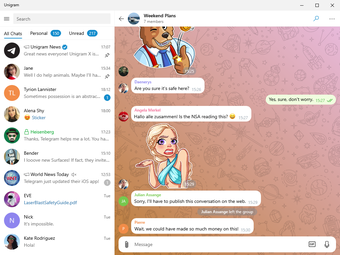
Unigram is a free instant messaging software that was developed by Unigram Inc. for PC. It is a desktop client of the popular mobile communication app, Telegram. It was created and optimized to run well on computers running Windows 10 and integrates with most of the operating system's built-in features for a seamless experience.
Top Recommended Alternative

Unigram serves as an open-source alternative to the official Telegram application that anyone can download and use on their PC. The interface is almost identical to it, with a few added features that users might find handy. It even supports multiple accounts just like the original.
How do I use Unigram?
If you have used the official Telegram client before, Unigram will feel very familiar to you as its design is nearly identical to it. You have various login methods available to you: you can use your phone number, or alternatively, you can scan the QR code that will be displayed on your screen—and the Telegram app will be needed for this. It also supports multiple accounts so you add and manage them as you see fit.
This software is just as feature-rich as the official client while building upon some of its features. It has 10 emoji sets to choose from compared to the original's four. The built-in video player is quite good, with various playback controls and a full-screen mode. While these features are lacking in the unofficial app, it makes up for it by letting users cast videos to other devices or open them with any third-party media player of their choice.
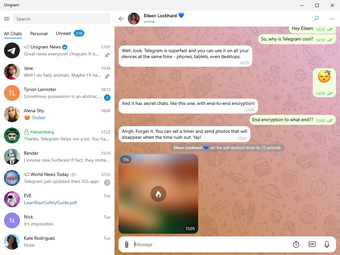
However, there is one feature that makes this stand out from the official app, and that is its support for end-to-end encryption for chats, as well as providing the option for setting a self-destruct timer for messages. Not everything is great news, though. One area where the client still needs work on is its performance, which can be sluggish at times, Another is there's no system tray shortcut for quick access and better notification display.
A decent open-source alternative
Overall, Unigram is a good open-source alternative to the official Telegram desktop client. It looks and functions pretty much the same way as the messaging app while improving upon some key features. Performance is decent enough, but it could be better. Nevertheless, if you like the additional features that it provides, this one is worth a try.